

AI Agents as Automations: What They Are and Where They Actually Work
The term "AI agent" is appearing in every vendor deck and strategy conversation right now. Most of the coverage stays abstract. This guide cuts through it.
An AI agent is software that can carry out a multi-step task across systems on its own, deciding and acting rather than just answering. Set up well, it automates a whole process, not a single reply. That distinction is what makes the category worth understanding, and what makes the implementation discipline matter.
Three things to take from this guide: An AI agent is defined by what it can do, not what it can say. The test is whether it can move work forward across systems within defined limits. The shift from chatbot or assistant to agent is a shift from interaction to process ownership. That changes how you design, govern and measure it. The smart starting point is one bounded workflow with clear triggers, permissions, and a human checkpoint, not a platform decision or a broad automation programme.
This piece covers the category. For customer-facing rollout detail, see our virtual agent implementation guide. For the chatbot and virtual agent comparison, that spoke has the full breakdown. For the compliance and governance depth that regulated environments need, the beyond Copilot guide and the FCA voice `agent piece pick up from here.
What is an AI agent, really?
Most definitions of an AI agent focus on what it sounds like. The useful definition focuses on what it does.
A chatbot generates a response. An AI agent pursues a goal. That sounds like a small difference until you map it to a real workflow: a chatbot tells a customer their order status; an agent checks the order system, flags an exception, raises a replacement request, and updates the customer, all without a human touching it.
The three traits that distinguish a genuine agent from a sophisticated chatbot or a glorified autocomplete tool:
- It takes actions, not just positions. An agent can write to systems, trigger processes, call APIs, update records, and move work from one state to another. Generating text is a means, not the output.
- It sequences steps with decision logic. An agent breaks a goal into steps, evaluates conditions at each one, and chooses a path based on what it finds. That might mean routing an exception to a human, retrying a failed API call, or completing the task autonomously when conditions are met.
- It operates within a defined boundary. A well-designed agent knows what it is authorised to do, what it must escalate, and what it cannot touch. That boundary is not a limitation; it is what makes the agent trustworthy enough to deploy in a real process.
The term "AI agent" is worth using when all three traits are present. When they are not, what you have is a capable assistant, which is still useful, just a different thing.
How is an AI agent different from a chatbot, an assistant, or RPA?
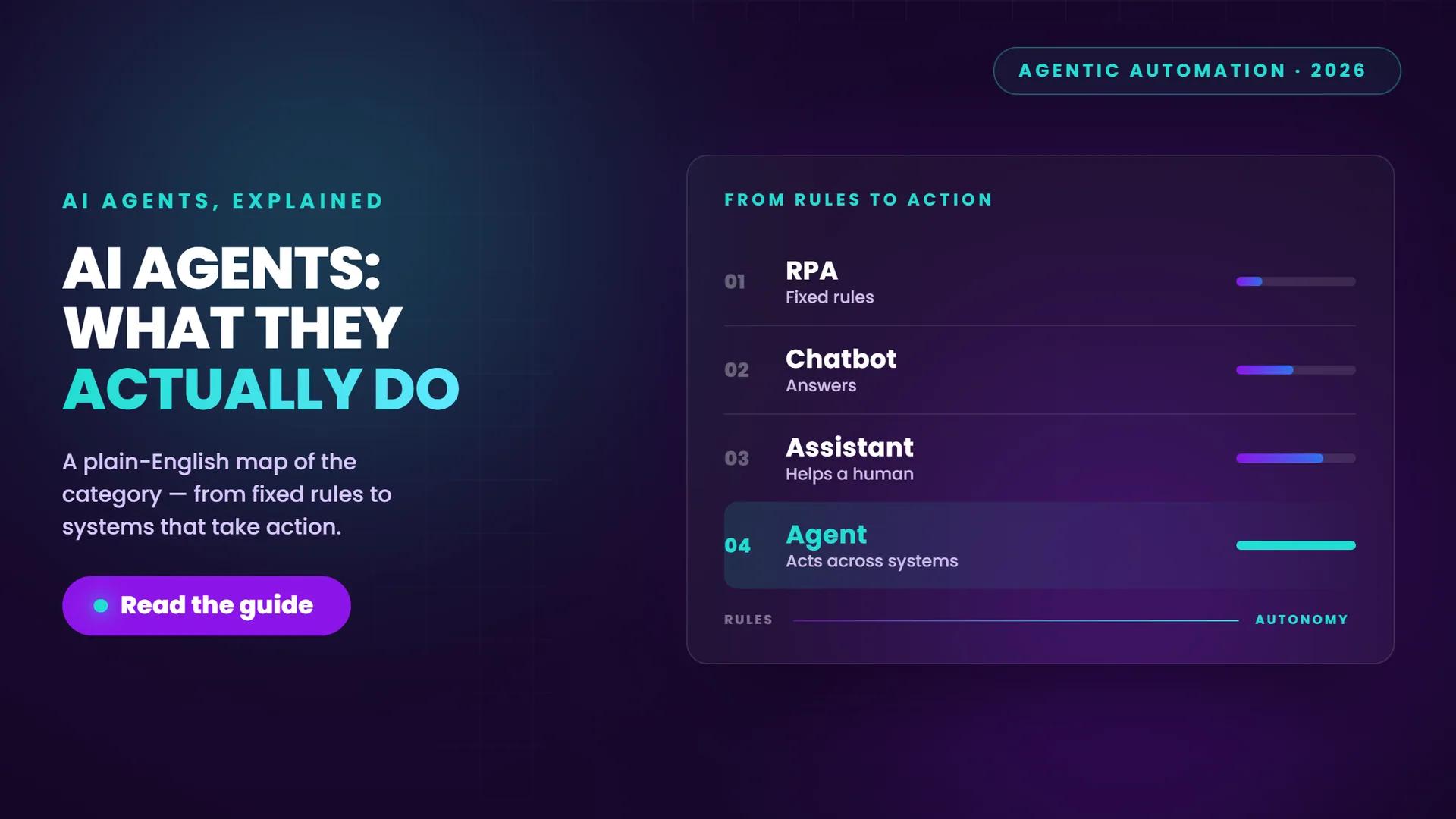
The confusion here is understandable. Vendors apply "agent" to almost everything now, and the underlying technologies genuinely overlap. A cleaner way to think about it is as a spectrum from fixed rules to adaptive action.
| Tool | What it does well | Where it breaks down |
|---|---|---|
| RPA (Robotic Process Automation) | Executes fixed, rules-based steps across structured systems with high reliability | Fails when inputs vary, exceptions arise, or processes change; brittle to UI or API changes |
| Chatbot | Answers questions within a defined interaction model; handles FAQs and scripted journeys | Cannot take action across systems; confined to the conversation window |
| AI assistant | Helps a user complete work faster, drafting, summarising, retrieving; augments the human | The human still owns each step; the assistant does not carry out the process independently |
| AI agent | Pursues a goal across multiple steps and systems, deciding and acting within defined limits | Requires careful design, clear boundaries and governance; not appropriate for every workflow |
Where they overlap, and why that matters
In practice, most organisations will not replace RPA or assistants with agents. They will use them together. An RPA bot might handle the structured, rules-based steps in a process while an agent handles the parts that require reading an unstructured document, making a routing decision, or dealing with an exception.
The meaningful shift that agents introduce is the ability to handle variation. RPA works brilliantly when every input looks the same. Agents are better suited to workflows where inputs differ, context matters, or the right next step depends on what the agent finds rather than what a rule prescribes.
For a detailed breakdown of chatbots versus virtual agents in a customer-facing context, the chatbot vs virtual agent comparison covers that distinction fully. This piece stays at the category level.
How do you set an AI agent up as an automation?
The model cleverness matters far less than the workflow design. An agent deployed without clear boundaries and system access will either fail to complete the task or complete it in ways you did not intend. The building blocks are consistent across use cases.
The six components of a workable agent automation
- A trigger. Every agent automation starts with something that kicks it off: a form submission, an inbound message, a scheduled time, a system event, or a signal from another process. Without a defined trigger, you have a capability, not an automation.
- Bounded task definition. Define precisely what the agent is trying to accomplish and where the task ends. "Handle customer complaints" is not a bounded task. "Read an inbound complaint email, classify it by type, draft a response for agent review, and update the CRM record" is.
- System access with least-privilege permissions. The agent needs access to the right data and tools to complete the task, nothing more. Granting broad permissions to simplify setup is one of the most common early mistakes. Scope access tightly from the start.
- Decision logic. Map out what the agent may decide autonomously, what requires a human to approve, and what must stop and escalate. This is the design work that most implementations underinvest in. The agent's decision logic is the process, not an afterthought.
- Human-in-the-loop and escalation paths. For higher-risk actions, build in approval checkpoints before the agent acts. For exceptions the agent cannot resolve, define a clear handoff. Human oversight is a design choice, not a fallback for when things go wrong.
- Monitoring and audit logging. Track completions, exceptions, corrections and business outcomes, not just interaction counts. An agent that completes 94% of tasks autonomously but handles the other 6% poorly is a problem you need to see early. Audit logs also matter for governance and, in regulated sectors, for compliance.
The practical test: if you cannot draw the trigger, the decision points, the escalation path and the success metric on a single page, the workflow is not ready to automate yet.
The implementation detail for customer-facing deployments sits in the virtual agent implementation guide. The setup logic above applies across back-office and customer-facing contexts alike.
Where do AI agents actually pay off?
The real gain from agentic automation is not shaving seconds off a single response. It is removing a process step entirely, or completing a multi-step workflow that previously required a person to move work between systems.
The use cases that pay off earliest share a few characteristics: high volume, repeatable structure with some variation, accessible data, and a manageable downside if a draft needs human review before it goes out.
| Good fit for an AI agent | Poor fit for an AI agent |
|---|---|
| Service request triage and routing | Highly sensitive decisions with no clear criteria |
| Complaint classification and draft response | Processes where data quality is poor or inconsistent |
| Internal approvals with defined criteria (expenses, access requests) | Workflows nobody owns or that lack a clear trigger |
| Onboarding task sequences across HR and IT systems | Highly regulated actions requiring human sign-off by law |
| Customer journey steps that need context and action together | Ambiguous tasks where the goal shifts mid-process |
| Scheduled reporting and data aggregation | Processes that change frequently without version control |
Where the value actually shows up
Organisations that see the clearest early returns tend to measure at the process level, not the interaction level. The metrics that matter are hours returned per week, cost-to-serve per case, throughput on a specific queue, escalation rate, and error reduction, not how many queries the agent handled.
The other consistent pattern: the best early use cases are not always the most visible ones. Back-office workflows, internal operations, and approval chains often deliver faster, cleaner value than customer-facing deployments, because the risk of a poor output is lower and the feedback loop is tighter.
Customer-facing agent deployments have their own set of design considerations. The virtual agent implementation guide covers those in detail.
What guardrails do AI agents need?
Guardrails are not a compliance afterthought. They are part of the workflow design, and they need to be in place before the agent touches a live process.
The minimum governance checklist for any agent automation:
- Process boundary definition - document which systems the agent can access, which actions it may take, and which it must never perform without human approval
- Identity and permissions - the agent should operate under a named service identity with least-privilege access, not shared credentials or broad admin rights
- Approval workflows - higher-risk actions (financial transactions, customer-facing communications, data deletions) need a human checkpoint before execution
- Audit logging - every action the agent takes should be logged with a timestamp, the input it acted on, the decision it made, and the outcome
- Escalation paths - define what happens when the agent encounters something outside its scope; a dead end is not an escalation path
- Drift monitoring - agent behaviour can shift as underlying models update or data patterns change; build in regular review checkpoints, not just a launch review
Regulated environments, particularly financial services, healthcare, and any sector with FCA oversight, need stricter controls, including explainability requirements, formal risk assessments, and documented human accountability for agent decisions. The beyond Copilot guide and the FCA voice agent piece cover those requirements in detail. This section is the starting point, not the full picture for regulated deployments.
Where should you start?
The same discipline runs through every successful agent deployment: start narrow, prove it, then expand.
- Pick one bounded workflow with a clear trigger, a defined end state, and an owner who understands the process.
- Run it in draft or review mode first - the agent produces outputs, a human approves them before any action is taken. Build confidence before you extend autonomy.
- Set one success metric before you launch: hours returned, cost-to-serve reduction, throughput improvement, or escalation rate. If you cannot measure it, you cannot improve it.
- Review after 30 days. Look at completions, exceptions, corrections and any edge cases the design did not anticipate. Adjust the decision logic before expanding scope.
- Expand one step at a time. Each new workflow or new permission level is a new design decision, not a natural extension of the first.
The Fortay whitepaper on agentic automation goes further on scoping, vendor selection, and building the internal case for investment. If you are at the evaluation stage, that is the practical next step.
Frequently asked questions
What is an AI agent, really?
An AI agent is software that can carry out a multi-step task across systems on its own, deciding and acting rather than just responding to a prompt. The defining traits are that it takes actions, sequences steps with decision logic, and operates within a defined boundary. When all three are present, you have an agent. When they are not, you have an assistant or a chatbot, which are still useful, but a different category.
How is an AI agent different from a chatbot, an assistant, or RPA?
A chatbot answers questions within a defined interaction model. An AI assistant helps a user complete work faster but leaves the human in control of each step. RPA executes fixed, rules-based steps reliably but fails when inputs vary or exceptions arise. An AI agent differs from all three by pursuing a goal across multiple steps and systems, making decisions based on what it finds, and handling variation that would break a rules-based script.
How do you set an AI agent up as an automation?
A workable agent automation requires six components: a defined trigger, a bounded task with a clear end state, system access scoped to least-privilege permissions, decision logic that maps what the agent may do autonomously and what must escalate, human-in-the-loop checkpoints for higher-risk actions, and audit logging to track completions, exceptions and outcomes. The workflow design matters more than the model. If you cannot draw the trigger, decision points and escalation path on one page, the workflow is not ready to automate yet.